
Webhooks
Webhooks let WebinarStack notify another system when something happens in or around a webinar. Instead of exporting data manually, you can send attendee activity to a CRM, sales workflow, data warehouse, no-code automation tool, or custom backend as soon as the event occurs.
This guide explains the webhook options available in WebinarStack, how to configure them, how to build a secure receiver, how to test delivery, and how to ask an AI assistant for help without exposing secrets.
Webhook Options In WebinarStack
Section titled “Webhook Options In WebinarStack”WebinarStack has three webhook-related surfaces. They solve different problems.
| Webhook Surface | Direction | Where You Configure It | Best For |
|---|---|---|---|
| Automation webhooks | WebinarStack sends events to your system. | Webinar editor > Automations. | Sending one trigger-based action to your CRM, backend, or no-code tool. |
| API webhook subscriptions | WebinarStack sends events to your system. | WebinarStack REST API. | Developer-managed subscriptions across multiple event types with one shared secret. |
| Revenue webhooks | Your payment provider sends purchase events into WebinarStack. | Settings > Revenue. | Attributing Stripe or generic HMAC purchase, refund, and chargeback events back to attendees and offers. |
Most users who say “set up a webhook” mean an automation webhook. Start there unless you specifically need an API-managed subscription or revenue attribution.
How Outbound Webhooks Work
Section titled “How Outbound Webhooks Work”An outbound webhook starts with a webinar automation rule.
- A webinar event happens, such as a registration, join, no-show, offer click, poll response, or chat message.
- WebinarStack evaluates enabled automation rules for that webinar and trigger.
- If the rule conditions pass, WebinarStack queues the webhook action.
- The webhook worker builds a JSON payload.
- WebinarStack signs the exact JSON body with the rule’s webhook secret.
- WebinarStack sends an HTTP
POSTrequest to your destination URL. - Your receiver verifies the signature, processes the event, and returns a
2xxresponse. - WebinarStack records the delivery status, response code, and a truncated response body.
The delivery is asynchronous. The attendee does not wait for your webhook receiver to finish.
Dashboard Automation Webhooks
Section titled “Dashboard Automation Webhooks”Dashboard automation webhooks are the easiest way to send one event-driven webhook from a webinar.
Use a dashboard automation webhook when:
- You want a webhook for one webinar.
- You want to configure the trigger and conditions visually.
- You want access to all automation triggers, including poll, chat, watch-time, adaptive branch, and time-based triggers.
- You do not need to manage subscriptions through the API.
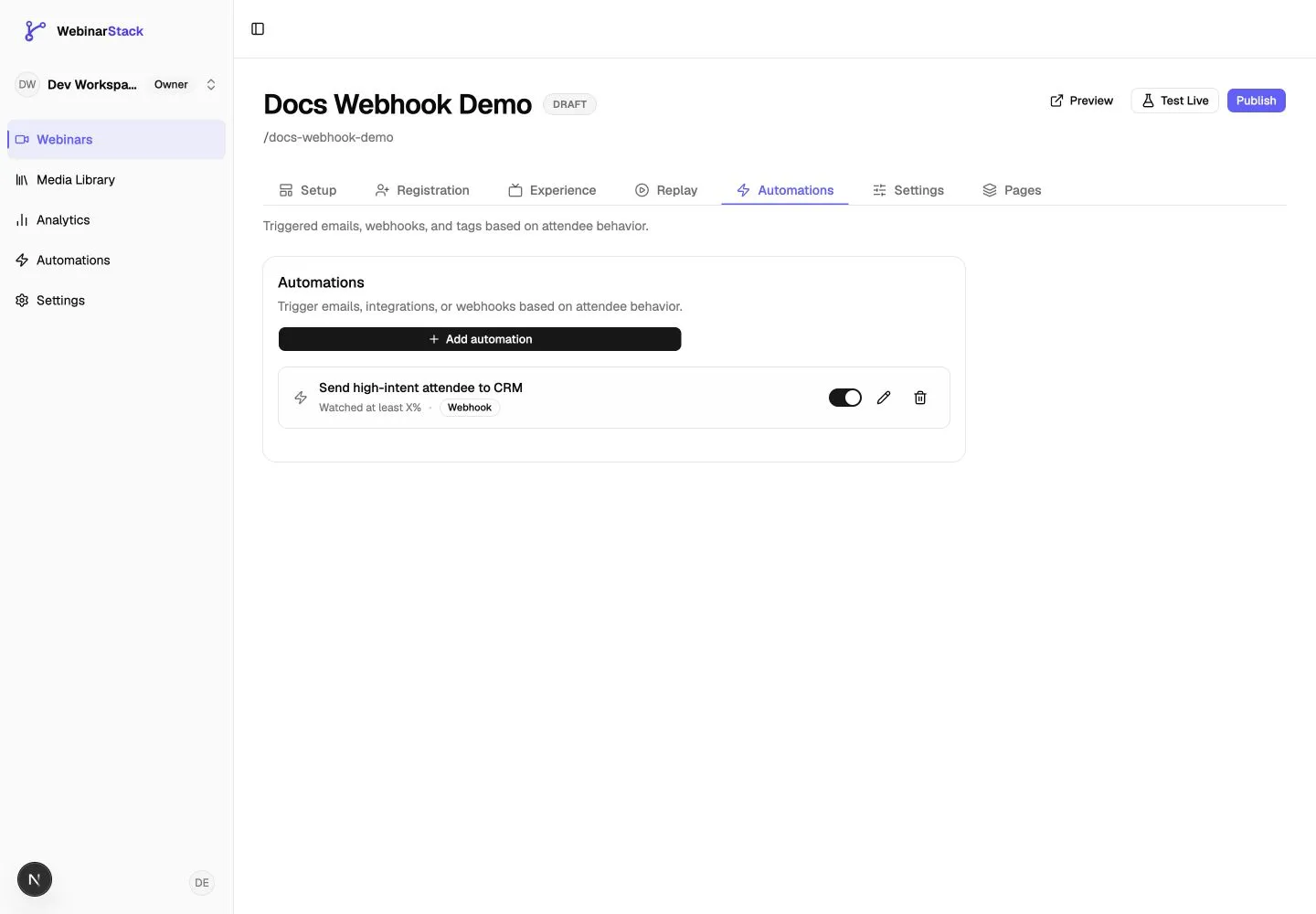
Create A Webhook Automation
Section titled “Create A Webhook Automation”- Open the webinar in the dashboard.
- Go to the Automations tab.
- Click Add automation.
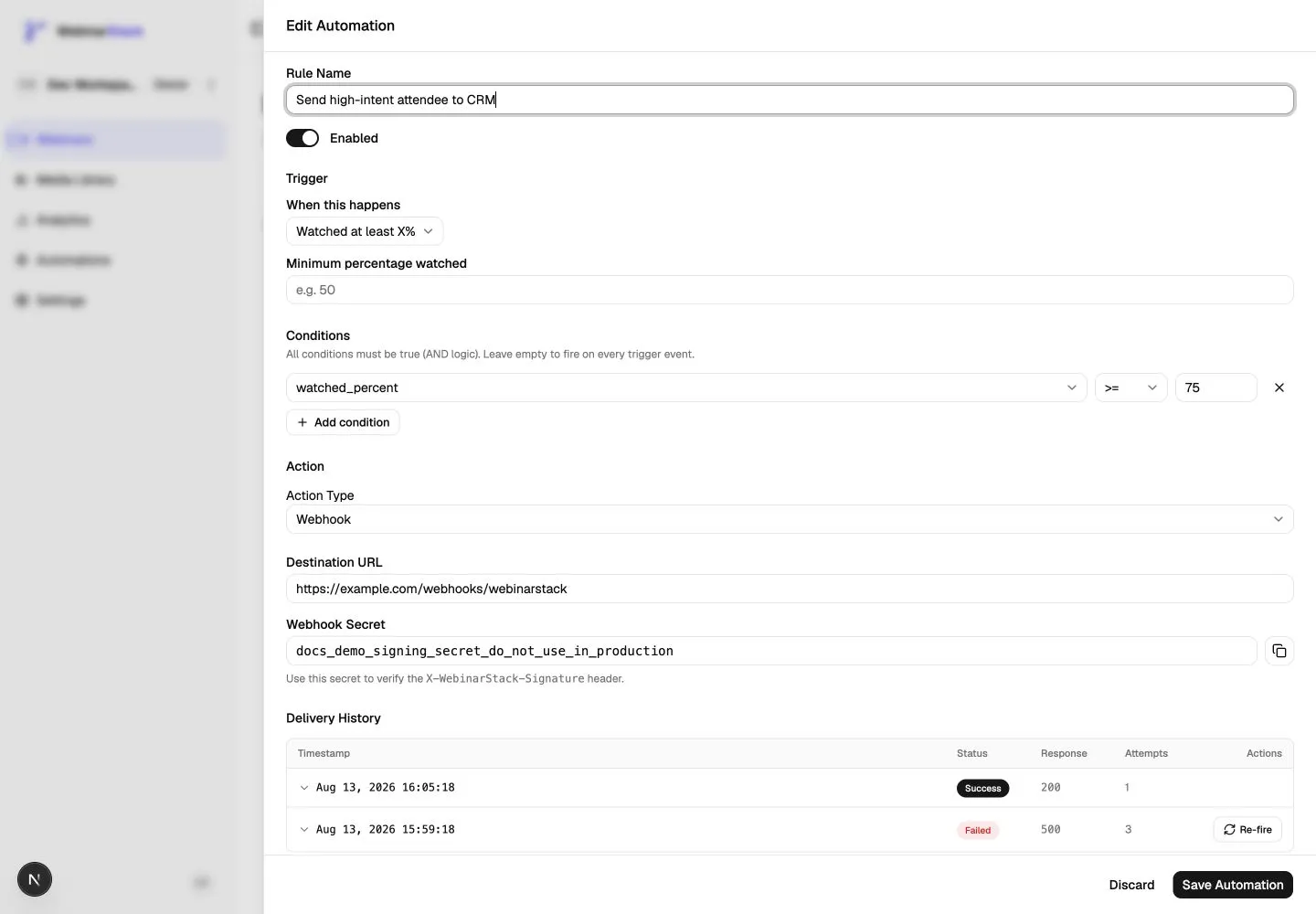
- Enter a Rule Name.
- Leave the rule Enabled unless you are still preparing the destination.
- Choose the trigger under When this happens.
- Add conditions if the rule should only fire for a narrower audience.
- Set Action Type to Webhook.
- Enter the Destination URL.
- Click Save Automation.
For a new dashboard rule, the webhook secret is generated after you save. Reopen the rule to copy it.
Webhook Rule Fields
Section titled “Webhook Rule Fields”| Field | Meaning |
|---|---|
| Rule Name | Internal label for your team. Use a specific name such as Send high-intent attendees to CRM. |
| Enabled | Whether the rule can fire. Disable it while preparing a receiver. |
| Trigger | The event that starts the rule. |
| Conditions | Extra filters that must all pass before the webhook sends. Conditions use AND logic. |
| Action Type | Choose Webhook. |
| Destination URL | The URL WebinarStack posts to. Use HTTPS in production. |
| Webhook Secret | Generated by WebinarStack. Store it in your receiver’s environment variables and use it to verify signatures. |
Supported Dashboard Triggers
Section titled “Supported Dashboard Triggers”Dashboard automation webhooks can use the same triggers as other automation actions.
| Trigger | When It Fires | Useful For |
|---|---|---|
| Registered | An attendee registers. | Create or update a CRM lead. |
| Joined webinar | An attendee joins a session. | Mark attendance in a CRM. |
| Left webinar | An attendee leaves. | Trigger exit follow-up workflows. |
| Didn’t show up | A registrant misses the session. | Send no-show data to a sales or nurture workflow. |
| Watched at least X minutes | Watch time reaches a minute threshold. | Identify engaged attendees. |
| Watched at least X% | Watch completion reaches a percentage threshold. | Segment high-intent viewers. |
| Completed the video | The attendee reaches completion. | Trigger completion certificates, offers, or sales tasks. |
| Clicked an offer | An attendee clicks an offer or CTA. | Notify sales, tag a lead, or start purchase follow-up. |
| Responded to a poll | An attendee answers a poll. | Route based on answer or enrich a contact profile. |
| Sent a chat message | An attendee sends a chat message. | Create support or sales tasks from questions. |
| Before session | A scheduled session is approaching. | Send data to an external reminder system. |
| After session | Webinar content ends. | Trigger post-webinar sync or reporting workflows. |
| Time elapsed after event | A delay passes after registration or session end. | Coordinate delayed workflows outside WebinarStack. |
| Branch taken | An adaptive webinar viewer takes a selected branch. | Track personalized path selection. |
| Segment completed | An adaptive webinar viewer completes a selected segment. | Trigger segment-specific follow-up. |
Before-session triggers require scheduled sessions. If a webinar only uses just-in-time sessions, before-session webhook rules may not fire.
Conditions
Section titled “Conditions”Conditions let you narrow when a webhook sends. All conditions must be true.
Examples:
- Send only when watch percentage is greater than or equal to
75. - Send only when joined is true.
- Send only when a specific offer was clicked.
- Send only when a specific poll answer was selected.
- Send only when a chat message contains a keyword such as
pricing.
Use conditions when a trigger is too broad by itself. For example, Clicked an offer sends for every matching offer click unless you select a specific offer or add a condition.
API Webhook Subscriptions
Section titled “API Webhook Subscriptions”API webhook subscriptions are for developers who want to manage webhook configuration programmatically.
To use these endpoints, create a WebinarStack API key from Settings > API Keys with REST API access and the automations:read / automations:write scopes needed for the operation.
Use the WebinarStack API Reference for the current endpoint list, request schemas, response schemas, and authentication details.
Use API subscriptions when:
- You want one subscription that listens to multiple event types.
- You want to create, update, disable, delete, rotate, and redeliver through the REST API.
- You are building an integration for multiple webinars.
- You want URL validation that requires a public HTTPS destination.
API subscriptions are separate from standalone dashboard webhook automation rules. The API list endpoints return webhook subscriptions created through the API subscription surface, not every standalone webhook rule created in the dashboard.
API Event Types
Section titled “API Event Types”API subscriptions support this curated event set:
| Event Type | Meaning |
|---|---|
registered |
An attendee registered. |
joined |
An attendee joined the webinar. |
left |
An attendee left the webinar. |
no_show |
A registrant did not attend. |
video_complete |
An attendee completed the video. |
cta_click |
An attendee clicked an offer or CTA. |
For poll responses, chat messages, adaptive branch events, or watch-time thresholds, use dashboard automation webhooks.
Create A Subscription
Section titled “Create A Subscription”Send a POST request to:
POST /api/v1/webinars/{webinarId}/webhooksExample:
curl -X POST https://app.webinarstack.co/api/v1/webinars/{webinarId}/webhooks \ -H "Authorization: Bearer wsk_live_..." \ -H "Content-Type: application/json" \ -H "Idempotency-Key: create-webhook-001" \ -d '{ "url": "https://example.com/webhooks/webinarstack", "eventTypes": ["registered", "joined", "video_complete"], "active": true }'The response includes a secret once. Store it securely.
{ "data": { "id": "subscription_id", "webinarId": "webinar_uuid", "url": "https://example.com/webhooks/webinarstack", "eventTypes": ["joined", "registered", "video_complete"], "active": true, "secret": "generated_signing_secret", "createdAt": "2026-08-13T18:00:00.000Z" }}The secret is not returned again in list responses. Use an idempotency key when creating a subscription so a safe retry can return the same creation response.
API Subscription Endpoint Requirements
Section titled “API Subscription Endpoint Requirements”API subscription URLs are validated server-side:
- The URL must be valid.
- The URL must use
https. - The hostname must resolve.
- The hostname must not resolve to private, loopback, or link-local IP ranges.
For local testing, use a public HTTPS tunnel such as ngrok or Cloudflare Tunnel.
Manage Subscriptions
Section titled “Manage Subscriptions”| Action | Method And Path | Notes |
|---|---|---|
| List subscriptions | GET /api/v1/webinars/{webinarId}/webhooks |
Does not return full secrets. |
| Get one subscription | GET /api/v1/webinars/{webinarId}/webhooks/{webhookId} |
Returns secretLast4 and secretRotatedAt. |
| Update subscription | PATCH /api/v1/webinars/{webinarId}/webhooks/{webhookId} |
Update url, eventTypes, or active. At least one field is required. |
| Delete subscription | DELETE /api/v1/webinars/{webinarId}/webhooks/{webhookId} |
Deletes all rule rows that share the subscription ID. |
| Rotate secret | POST /api/v1/webinars/{webinarId}/webhooks/{webhookId}/rotate-secret |
Returns the new secret once and immediately invalidates the old one. |
| List deliveries | GET /api/v1/webinars/{webinarId}/webhooks/{webhookId}/deliveries |
Cursor-paginated delivery history. |
| Get delivery | GET /api/v1/webinars/{webinarId}/webhooks/{webhookId}/deliveries/{deliveryId} |
Includes delivery status and response details. |
| Redeliver | POST /api/v1/webinars/{webinarId}/webhooks/{webhookId}/deliveries/{deliveryId}/redeliver |
Queues a new delivery and returns 202 Accepted. |
Secret rotation has no grace window. Update your receiver with the new secret before the next webhook sends.
Outbound Webhook Request
Section titled “Outbound Webhook Request”WebinarStack sends outbound webhooks as HTTP POST requests.
Headers:
| Header | Meaning |
|---|---|
Content-Type: application/json |
The request body is JSON. |
X-WebinarStack-Signature: sha256=<hex> |
HMAC-SHA256 signature of the exact raw request body. |
User-Agent: WebinarStack/1.0 |
Identifies WebinarStack as the sender. |
The signature is calculated as:
HMAC-SHA256(raw_request_body, webhook_secret)The secret itself is not sent in the request. Your receiver stores the secret and uses it to verify the signature header.
Payload Shape
Section titled “Payload Shape”Outbound webhook payloads use a common envelope:
{ "event_type": "registered", "attendee": { "name": "Jane Attendee", "email": "jane@example.com", "registration_id": "registration_uuid", "utm_source": "newsletter", "utm_medium": "email", "utm_campaign": "launch" }, "webinar": { "id": "webinar_uuid", "title": "How to Scale Your Funnel" }, "event_data": {}, "timestamp": "2026-08-13T18:00:00.000Z"}Fields:
| Field | Meaning |
|---|---|
event_type |
The automation trigger that fired. |
attendee.name |
Attendee name from registration. |
attendee.email |
Attendee email from registration. |
attendee.registration_id |
WebinarStack registration ID. |
attendee.utm_source |
UTM source from registration, or null. |
attendee.utm_medium |
UTM medium from registration, or null. |
attendee.utm_campaign |
UTM campaign from registration, or null. |
webinar.id |
Webinar ID. |
webinar.title |
Internal webinar title. |
event_data |
Trigger-specific details. Shape varies by trigger. |
timestamp |
Time when the outbound webhook payload was built. |
is_refire |
Present and true when a user manually re-fires or redelivers a webhook. |
Build your receiver to accept new fields without failing. WebinarStack may add fields over time.
Trigger-Specific Event Data
Section titled “Trigger-Specific Event Data”The event_data object depends on the trigger.
Common examples:
| Trigger | Example event_data Fields |
|---|---|
registered |
Usually empty. |
joined |
Usually empty. |
left |
Event payload fields from the attendee event, when available. |
no_show |
detectedAt, sessionStartedAt. |
watched_minutes |
watchedSeconds, completionPercent, optionally in_transition. |
watched_percent |
watchedSeconds, completionPercent, optionally in_transition. |
cta_click |
interactionId or offerId; may include interaction.id, interaction.headline, interaction.internal_name. |
poll_response |
interactionId, optionId, selectedOption; may include interaction.id, interaction.headline, interaction.internal_name. |
chat_response |
message, sent_at, message_event_id. |
branch_taken |
branch_id, segment_id. |
segment_completed |
segment_id, watch_duration_seconds. |
Treat event_data as optional and event-specific. Do not require a poll field on a registration event, or an interaction field on a join event.
Offer Click Example
Section titled “Offer Click Example”{ "event_type": "cta_click", "attendee": { "name": "Jane Attendee", "email": "jane@example.com", "registration_id": "registration_uuid", "utm_source": null, "utm_medium": null, "utm_campaign": null }, "webinar": { "id": "webinar_uuid", "title": "Product Demo" }, "event_data": { "interactionId": "offer_uuid", "interaction": { "id": "offer_uuid", "headline": "Start your trial", "internal_name": "Trial offer - webinar midpoint" } }, "timestamp": "2026-08-13T18:00:00.000Z"}Poll Response Example
Section titled “Poll Response Example”{ "event_type": "poll_response", "attendee": { "name": "Jane Attendee", "email": "jane@example.com", "registration_id": "registration_uuid", "utm_source": "linkedin", "utm_medium": "paid", "utm_campaign": "demo" }, "webinar": { "id": "webinar_uuid", "title": "Product Demo" }, "event_data": { "interactionId": "poll_uuid", "optionId": "option_uuid", "selectedOption": "I want to talk to sales", "interaction": { "id": "poll_uuid", "headline": "What should we help you with?", "internal_name": "Mid-webinar qualification poll" } }, "timestamp": "2026-08-13T18:00:00.000Z"}Chat Response Example
Section titled “Chat Response Example”{ "event_type": "chat_response", "attendee": { "name": "Jane Attendee", "email": "jane@example.com", "registration_id": "registration_uuid", "utm_source": null, "utm_medium": null, "utm_campaign": null }, "webinar": { "id": "webinar_uuid", "title": "Product Demo" }, "event_data": { "message": "Can someone send me pricing?", "sent_at": "2026-08-13T18:00:00.000Z", "message_event_id": "event_uuid" }, "timestamp": "2026-08-13T18:00:00.000Z"}Build A Webhook Receiver
Section titled “Build A Webhook Receiver”Your receiver should do four things:
- Read the raw request body before parsing JSON.
- Verify
X-WebinarStack-Signature. - Return a
2xxresponse quickly. - Process the event idempotently.
Do not verify the signature against JSON.stringify(req.body) after your framework has parsed the request. Signature verification must use the exact raw body bytes.
Next.js Route Handler Example
Section titled “Next.js Route Handler Example”import crypto from 'node:crypto'
function verifySignature(rawBody: string, signatureHeader: string | null, secret: string) { if (!signatureHeader) return false
const [scheme, signature] = signatureHeader.split('=', 2) if (scheme !== 'sha256' || !signature) return false
const expected = crypto .createHmac('sha256', secret) .update(rawBody) .digest('hex')
const expectedBuffer = Buffer.from(expected, 'hex') const actualBuffer = Buffer.from(signature, 'hex')
if (actualBuffer.length !== expectedBuffer.length) return false return crypto.timingSafeEqual(actualBuffer, expectedBuffer)}
export async function POST(request: Request) { const rawBody = await request.text() const signature = request.headers.get('x-webinarstack-signature') const secret = process.env.WEBINARSTACK_WEBHOOK_SECRET
if (!secret) { return new Response('missing webhook secret', { status: 500 }) }
if (!verifySignature(rawBody, signature, secret)) { return new Response('invalid signature', { status: 401 }) }
const event = JSON.parse(rawBody) as { event_type: string attendee?: { email?: string; registration_id?: string } webinar?: { id?: string; title?: string } event_data?: Record<string, unknown> is_refire?: boolean }
// Do minimal validation, then queue durable work. // Example: await queue.add('webinarstack-webhook', event)
return new Response('ok', { status: 200 })}Express Example
Section titled “Express Example”import express from 'express'import crypto from 'node:crypto'
const app = express()
app.post( '/webhooks/webinarstack', express.raw({ type: 'application/json' }), (req, res) => { const rawBody = req.body.toString('utf8') const signatureHeader = req.header('x-webinarstack-signature') const secret = process.env.WEBINARSTACK_WEBHOOK_SECRET
if (!secret || !signatureHeader) { return res.status(401).send('invalid signature') }
const [scheme, signature] = signatureHeader.split('=', 2) const expected = crypto .createHmac('sha256', secret) .update(rawBody) .digest('hex')
const valid = scheme === 'sha256' && signature && Buffer.from(signature, 'hex').length === Buffer.from(expected, 'hex').length && crypto.timingSafeEqual(Buffer.from(signature, 'hex'), Buffer.from(expected, 'hex'))
if (!valid) { return res.status(401).send('invalid signature') }
const event = JSON.parse(rawBody) // Queue or process the event.
return res.status(200).send('ok') },)FastAPI Example
Section titled “FastAPI Example”import hashlibimport hmacimport jsonimport os
from fastapi import FastAPI, Header, HTTPException, Request
app = FastAPI()
def verify_signature(raw_body: bytes, signature_header: str | None, secret: str) -> bool: if not signature_header: return False
try: scheme, signature = signature_header.split("=", 1) except ValueError: return False
if scheme != "sha256": return False
expected = hmac.new(secret.encode("utf-8"), raw_body, hashlib.sha256).hexdigest() return hmac.compare_digest(signature, expected)
@app.post("/webhooks/webinarstack")async def webinarstack_webhook( request: Request, x_webinarstack_signature: str | None = Header(default=None),): raw_body = await request.body() secret = os.environ.get("WEBINARSTACK_WEBHOOK_SECRET")
if not secret or not verify_signature(raw_body, x_webinarstack_signature, secret): raise HTTPException(status_code=401, detail="invalid signature")
event = json.loads(raw_body) # Queue or process event.
return {"ok": True}Idempotency
Section titled “Idempotency”Webhook delivery is at-least-once. Your receiver should tolerate duplicates.
Duplicates can happen when:
- WebinarStack retries after your endpoint times out.
- WebinarStack retries after a non-2xx response.
- A user manually re-fires or redelivers a webhook.
- Your endpoint processes the event but fails before returning a
2xxresponse.
For dashboard automation webhooks, WebinarStack prevents the same automation rule from firing repeatedly for the same attendee and session in normal automated flows. Chat-response automations can be configured to fire once per session or on every matching message. Manual re-fire is intentionally a new delivery.
Because the outbound payload does not include a single universal delivery ID, choose an idempotency key that matches your workflow. Examples:
| Workflow | Suggested Receiver Idempotency Key |
|---|---|
| Registration sync | webinar.id + event_type + attendee.registration_id |
| Offer click task | webinar.id + event_type + attendee.registration_id + event_data.interactionId |
| Poll answer sync | webinar.id + event_type + attendee.registration_id + event_data.interactionId + event_data.optionId |
| Chat question task | webinar.id + event_type + attendee.registration_id + event_data.message_event_id |
| Manual re-fire audit | Include is_refire or store a separate re-fire log entry. |
If your downstream system supports upsert operations, prefer upsert over blind create.
Delivery Behavior
Section titled “Delivery Behavior”Your endpoint should return a 2xx response within 10 seconds.
WebinarStack treats these as success:
200 OK201 Created202 Accepted204 No Content- Any other
2xxresponse
WebinarStack treats these as failure:
- Network errors
- Timeouts
4xxresponses5xxresponses- A final non-2xx response after redirects
Failed webhook deliveries are retried by the background worker. The delivery history records the status, response code, attempt count, delivered timestamp, and response body snippet. Response bodies are truncated, so return concise diagnostic text from your receiver.
Good receiver responses:
ok{ "ok": true }Useful failure responses:
missing email{ "error": "unknown webinar id" }Avoid returning large HTML error pages. They are harder to read in delivery history and may be truncated.
Monitor And Re-Fire Dashboard Webhooks
Section titled “Monitor And Re-Fire Dashboard Webhooks”For dashboard automation webhooks:
- Open the webinar.
- Go to Automations.
- Edit the webhook rule.
- Scroll to Delivery History.
The delivery history shows:
- Timestamp
- Status
- Response code
- Attempt count
- Response body details when available
- Re-fire button for failed deliveries
The Re-fire button is available only for failed dashboard webhook deliveries. Re-fire queues a new webhook delivery and includes is_refire: true in the payload.
For API webhook subscriptions, use the delivery endpoints to list, inspect, and redeliver deliveries. API redelivery returns 202 Accepted with a new delivery ID, then the delivery proceeds asynchronously.
Test A Webhook Receiver
Section titled “Test A Webhook Receiver”Test With A Request Inspector
Section titled “Test With A Request Inspector”A request inspector such as Webhook.site can confirm that WebinarStack is reaching the destination URL. This is useful for initial setup.
Use request inspectors carefully:
- Do not use them for production traffic.
- Do not paste webhook secrets into public tools.
- Do not send real attendee data unless your policies allow it.
- Use them to inspect headers and shape, then switch to your real receiver.
Test With A Signed Curl Request
Section titled “Test With A Signed Curl Request”You can simulate WebinarStack locally by signing a sample body with your webhook secret.
Create a sample body:
{ "event_type": "registered", "attendee": { "name": "Test User", "email": "test@example.com", "registration_id": "test-registration-id", "utm_source": null, "utm_medium": null, "utm_campaign": null }, "webinar": { "id": "test-webinar-id", "title": "Test Webinar" }, "event_data": {}, "timestamp": "2026-08-13T18:00:00.000Z"}Sign and send it with Node:
export WEBHOOK_SECRET="replace_with_your_secret"export WEBHOOK_URL="https://example.com/webhooks/webinarstack"
export BODY='{"event_type":"registered","attendee":{"name":"Test User","email":"test@example.com","registration_id":"test-registration-id","utm_source":null,"utm_medium":null,"utm_campaign":null},"webinar":{"id":"test-webinar-id","title":"Test Webinar"},"event_data":{},"timestamp":"2026-08-13T18:00:00.000Z"}'
SIG=$(node -e "const crypto=require('node:crypto'); const body=process.env.BODY; const secret=process.env.WEBHOOK_SECRET; console.log(crypto.createHmac('sha256', secret).update(body).digest('hex'))")
curl -X POST "$WEBHOOK_URL" \  -H "Content-Type: application/json" \  -H "X-WebinarStack-Signature: sha256=$SIG" \  --data "$BODY"
The body you sign must exactly match the body you send.
Test From WebinarStack
Section titled “Test From WebinarStack”After your receiver passes local tests:
- Create the webhook rule.
- Trigger the event with a test registration or test attendee session.
- Confirm your receiver logs the event.
- Confirm the signature verification passes.
- Confirm the receiver returns
2xx. - Check Delivery History in the automation rule.
Connect To Common Tools
Section titled “Connect To Common Tools”CRM Or Sales System
Section titled “CRM Or Sales System”Common webhook mappings:
| WebinarStack Field | CRM Field |
|---|---|
attendee.email |
Lead or contact email. |
attendee.name |
Lead or contact name. |
webinar.title |
Campaign, event, or source detail. |
event_type |
Activity type or lifecycle event. |
attendee.utm_source |
Lead source. |
attendee.utm_campaign |
Campaign. |
event_data.interaction.internal_name |
Offer or poll label. |
Recommended pattern:
- Upsert the contact by email.
- Add or update webinar-specific fields.
- Append an activity record for the event.
- Create a task only for high-intent events, such as offer clicks or pricing chat messages.
Slack Or Internal Alerts
Section titled “Slack Or Internal Alerts”Use webhooks for high-signal events, not every heartbeat or minor activity.
Good Slack alert examples:
- Offer clicked.
- Chat message contains
pricing. - Watched at least 80 percent.
- Took a high-intent adaptive branch.
- No-show for a VIP invite list.
Use webhooks for one-way Slack alerts. If your team needs to reply to attendee chat from Slack threads, use the Slack Chat Integration.
Data Warehouse
Section titled “Data Warehouse”For analytics pipelines:
- Verify the signature.
- Store the raw JSON payload.
- Store a normalized table with
event_type,registration_id,webinar_id,attendee.email,timestamp, and relevantevent_datafields. - Use idempotent inserts or merge operations.
- Preserve unknown fields for future compatibility.
No-Code Tools
Section titled “No-Code Tools”Many no-code tools can receive webhooks, but not all of them can verify HMAC signatures.
If your no-code tool cannot verify X-WebinarStack-Signature, use a small secure bridge:
- WebinarStack sends to your bridge endpoint.
- The bridge verifies the signature.
- The bridge forwards safe, normalized data to Zapier, Make, Airtable, Sheets, or another tool.
This keeps the webhook secret out of tools that cannot protect or verify it properly.
For a no-code setup walkthrough, field mapping examples, Zapier troubleshooting, and AI prompts, see the Zapier Integration guide.
Revenue Webhooks
Section titled “Revenue Webhooks”Revenue webhooks are inbound webhooks. They send purchase data into WebinarStack so revenue can be attributed to attendees, webinars, and offers.
Configure revenue webhooks in Settings > Revenue.
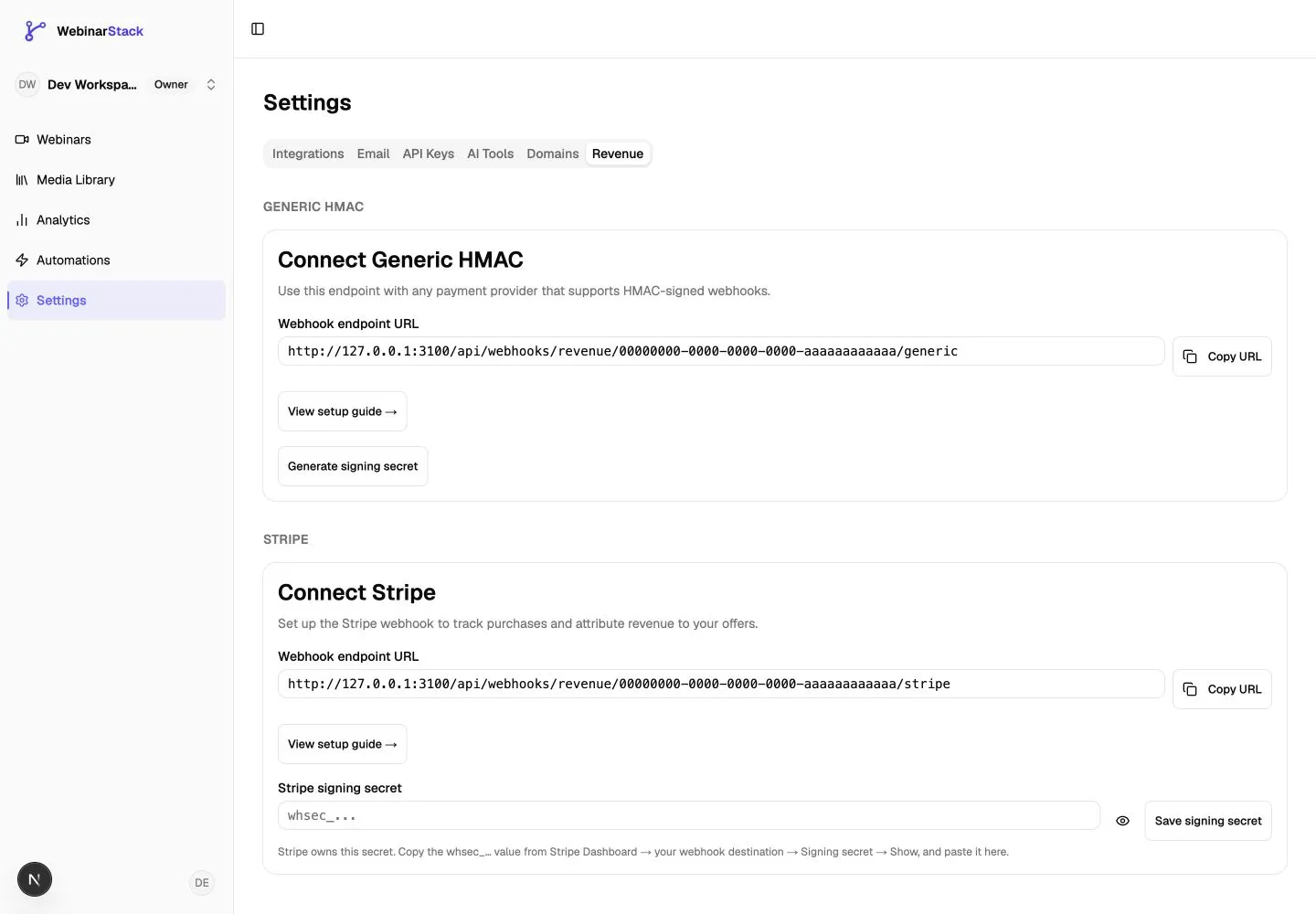
For a full Stripe setup walkthrough, event mapping, attribution rules, analytics behavior, and troubleshooting, see Stripe Revenue Tracking.
Your account will show its own endpoint host. Copy the URL displayed in your dashboard when configuring an external payment tool.
Stripe Revenue Webhook
Section titled “Stripe Revenue Webhook”Use the Stripe revenue webhook when purchases happen in Stripe and you want WebinarStack analytics to show revenue.
High-level setup:
- In WebinarStack, open Settings > Revenue.
- Copy the Stripe endpoint URL.
- In Stripe, create a webhook endpoint using that URL.
- Select relevant Stripe events, such as checkout session completion, successful charges, paid invoices, refunds, and disputes.
- Copy Stripe’s
whsec_...signing secret. - Paste that signing secret back into WebinarStack.
- Send a Stripe test event.
- Confirm the Last purchase received timestamp updates.
Stripe owns the signing secret for Stripe webhooks. Copy it from Stripe into WebinarStack.
Generic HMAC Revenue Webhook
Section titled “Generic HMAC Revenue Webhook”Use Generic HMAC for a custom checkout or non-Stripe payment provider.
Your provider posts JSON to:
POST /api/webhooks/revenue/{accountId}/genericPayload:
{ "event_id": "provider_unique_event_id", "email": "buyer@example.com", "amount_minor": 12000, "currency": "USD", "type": "purchase", "original_transaction_id": null, "timestamp": "2026-08-13T18:00:00.000Z"}Generic revenue requests must include:
X-WebinarStack-Signature: sha256=<hex>where <hex> is HMAC-SHA256(raw_body, generic_revenue_signing_secret).
For refunds and chargebacks, amount_minor should be zero or negative. Use original_transaction_id to pair the event to the original purchase when possible.
Security Checklist
Section titled “Security Checklist”Before going live:
- Use HTTPS for production webhook destinations.
- Store webhook secrets in environment variables or a secret manager.
- Never hard-code webhook secrets in source code.
- Never paste real webhook secrets into public AI chats, issue trackers, or support tickets.
- Verify
X-WebinarStack-Signatureagainst the raw request body. - Use constant-time comparison for HMAC checks.
- Return
2xxquickly and do slow work asynchronously. - Make downstream actions idempotent.
- Log enough context to debug, but avoid logging full attendee payloads unless your privacy policy allows it.
- Treat
event_dataas trigger-specific and forward-compatible. - Rotate secrets if a secret is exposed.
Troubleshooting
Section titled “Troubleshooting”Delivery History Shows Failed
Section titled “Delivery History Shows Failed”Check:
- Did your endpoint return a non-2xx status?
- Did it take longer than 10 seconds?
- Did your framework reject the request before your handler ran?
- Is the URL correct?
- Is the endpoint public and reachable?
- Does the response body contain an error message?
- Did the receiver expect a field that is not present for that trigger?
Fix the receiver first, then re-fire or redeliver the webhook.
Signature Verification Fails
Section titled “Signature Verification Fails”Common causes:
- You copied the wrong secret.
- You rotated the secret but did not update the receiver.
- You verified
JSON.stringify(parsedBody)instead of the raw body. - Middleware parsed or modified the body before verification.
- You included
sha256=in the HMAC input instead of only using it as the header prefix. - Your comparison expects base64, but WebinarStack sends hex.
You See Duplicate Records Downstream
Section titled “You See Duplicate Records Downstream”Add idempotency in your receiver. Use a key based on the attendee, webinar, event type, and trigger-specific IDs.
For manual re-fires, decide whether to update the existing record, create an audit record, or ignore the duplicate.
The Webhook Never Fires
Section titled “The Webhook Never Fires”Check:
- The automation rule is enabled.
- The webinar event actually happened.
- The trigger type matches the event.
- Conditions are not too restrictive.
- Before-session triggers are not being used on a JIT-only webinar.
- For adaptive branch triggers, the webinar is adaptive and the selected branch or segment exists.
- For API subscriptions, the subscription is active and includes the desired event type.
A No-Code Tool Receives The Event But Cannot Verify It
Section titled “A No-Code Tool Receives The Event But Cannot Verify It”Use a verified bridge endpoint. Ask an engineer or an AI assistant to create a small endpoint that verifies the signature, transforms the payload, and forwards safe fields to the no-code tool.
How To Ask AI For Help
Section titled “How To Ask AI For Help”Your favorite AI assistant can help you build and debug webhook integrations quickly. The safest pattern is to describe the contract, paste redacted payload samples, and use placeholders for secrets.
Do not paste real webhook secrets into AI tools. Use placeholders such as WEBINARSTACK_WEBHOOK_SECRET or replace_with_secret_from_env.
Prompt: Build A Receiver Endpoint
Section titled “Prompt: Build A Receiver Endpoint”I need a webhook receiver for WebinarStack in [framework/language].
Webhook contract:- Method: POST- Body: JSON- Signature header: X-WebinarStack-Signature: sha256=<hex>- Signature algorithm: HMAC-SHA256(raw request body, WEBINARSTACK_WEBHOOK_SECRET)- The secret must come from an environment variable, not source code.- The handler must verify the signature before parsing or trusting the JSON.- It should return 2xx quickly and queue slow work asynchronously.
Payload envelope:{ "event_type": "registered", "attendee": { "name": "Jane Attendee", "email": "jane@example.com", "registration_id": "registration_uuid", "utm_source": null, "utm_medium": null, "utm_campaign": null }, "webinar": { "id": "webinar_uuid", "title": "Product Demo" }, "event_data": {}, "timestamp": "2026-08-13T18:00:00.000Z"}
Please write production-quality code, explain how raw body handling works in this framework, and include a small test that proves invalid signatures are rejected.Prompt: Map WebinarStack Events To My CRM
Section titled “Prompt: Map WebinarStack Events To My CRM”I want to map WebinarStack webhook payloads into [CRM/tool name].
Here are the events I care about:- registered- joined- cta_click- poll_response- chat_response
Here is the payload envelope and example event_data:[paste redacted payload examples here]
Please design a field mapping for contacts, campaign membership, activities, and sales tasks. Use attendee.email as the primary contact lookup key. Make the design idempotent so webhook retries do not create duplicate records.Prompt: Generate A Signed Test Request
Section titled “Prompt: Generate A Signed Test Request”Write a local test script that sends a signed WebinarStack-style webhook request to my development endpoint.
Requirements:- Language: [Node.js/Python/etc.]- Read WEBINARSTACK_WEBHOOK_SECRET and WEBHOOK_URL from environment variables.- Build a JSON payload for event_type "registered".- Sign the exact raw JSON string with HMAC-SHA256.- Send X-WebinarStack-Signature as sha256=<hex>.- Print the HTTP status and response body.- Do not hard-code secrets.Prompt: Debug A Failed Delivery
Section titled “Prompt: Debug A Failed Delivery”Help me debug a failed WebinarStack webhook delivery.
Facts:- Destination URL: [redacted host/path]- Event type: [event_type]- HTTP response status in WebinarStack: [status]- Response body shown in delivery history: [paste response body]- Receiver framework: [framework]- I verify X-WebinarStack-Signature using HMAC-SHA256 over the raw request body.
Please give me the most likely causes, what logs to add, and a step-by-step test plan. Do not ask me to paste the real webhook secret.Prompt: Review My Signature Verification
Section titled “Prompt: Review My Signature Verification”Please review this webhook signature verification code for security and correctness.
Webhook contract:- Header: X-WebinarStack-Signature: sha256=<hex>- Algorithm: HMAC-SHA256(raw request body, secret)- The secret is stored in WEBINARSTACK_WEBHOOK_SECRET.
Check specifically for:- Raw body handling before JSON parsing- Constant-time comparison- Correct hex decoding- Rejecting missing or malformed headers- Avoiding secret logging- Returning 401 on invalid signatures
Here is my code:[paste code with secrets removed]Prompt: Create A Secure No-Code Bridge
Section titled “Prompt: Create A Secure No-Code Bridge”I need to connect WebinarStack webhooks to [Zapier/Make/Airtable/Google Sheets], but the destination cannot verify HMAC signatures.
Design a secure bridge endpoint that:- Receives WebinarStack webhook POSTs- Verifies X-WebinarStack-Signature using WEBINARSTACK_WEBHOOK_SECRET- Normalizes the payload to the fields my no-code tool needs- Forwards only non-secret fields to the no-code webhook URL- Returns 2xx quickly- Retries forwarding safely or queues failures
Please include deployment recommendations for [Vercel/Cloudflare Workers/AWS Lambda/etc.] and explain where to store secrets.Prompt: Plan A Revenue Webhook Integration
Section titled “Prompt: Plan A Revenue Webhook Integration”I want to send purchase data into WebinarStack using the Generic HMAC revenue webhook.
Contract:- Method: POST- URL: /api/webhooks/revenue/{accountId}/generic- Header: X-WebinarStack-Signature: sha256=<hex>- Signature: HMAC-SHA256(raw body, generic revenue signing secret)- JSON fields: - event_id: unique provider event ID - email: buyer email - amount_minor: integer minor units - currency: 3-letter currency code - type: purchase, refund, or chargeback - original_transaction_id: original purchase ID for refund or chargeback, nullable - timestamp: ISO datetime
Please help me map [payment provider/custom checkout] events into this payload, including how to make event_id idempotent and how to sign the exact raw body.Prompt: Write An Internal Runbook
Section titled “Prompt: Write An Internal Runbook”Create a runbook for our team to operate WebinarStack webhooks.
Include:- Where the receiver is deployed- Which WebinarStack rules or API subscriptions send to it- Which environment variable stores the secret- How to rotate the secret- How to test with a signed sample payload- How to read WebinarStack delivery history- What to do for failed deliveries- How to avoid duplicate downstream records
Do not include real secrets. Use placeholders.Go-Live Checklist
Section titled “Go-Live Checklist”- Destination URL is public and HTTPS.
- Receiver verifies
X-WebinarStack-Signature. - Secret is stored outside source code.
- Receiver handles duplicate deliveries.
- Receiver returns
2xxwithin 10 seconds. - Receiver logs enough to debug failures.
- A signed local test passes.
- A real WebinarStack test event reaches the receiver.
- Delivery History shows success.
- Your team has a rotation and failure runbook.