
Claude Code MCP Connections
The WebinarStack MCP server lets Claude Code work with your WebinarStack account through typed tools instead of copied screenshots, exported CSVs, or manual setup notes.
Use this guide when you want Claude Code to inspect webinars, draft setup changes, audit launch readiness, summarize analytics, configure automations, work with offers and polls, or create test registrations from your terminal workflow.
This page is specifically for Claude Code. If you are setting up the connector in Claude Web or Claude Desktop, use Claude Web and Desktop MCP Setup.
The Short Version
Section titled “The Short Version”| Concept | What It Means |
|---|---|
| Server URL | Copy the hosted MCP endpoint from WebinarStack settings. It ends in /api/mcp. |
| Best Claude Code transport | Remote HTTP for most users. |
| Browser authorization option | Add the remote HTTP server without a bearer header, then authenticate from /mcp. |
| API-key option | Create an MCP key in WebinarStack and attach it as Authorization: Bearer .... |
| Local wrapper option | Use npx -y @webinarstack/mcp --server-url <url> when you want a local stdio server. |
| Key environment variable | WEBINARSTACK_API_KEY. |
| Key prefix | API-key MCP credentials start with wsk_live_. OAuth tokens are handled by Claude and are not copied by you. |
| Main status command | Run /mcp inside Claude Code. |
| Management commands | claude mcp list, claude mcp get webinarstack, and claude mcp remove webinarstack. |
| Activity visibility | API-key calls appear in API Keys activity. OAuth connector grants appear in Connected Apps. |
The safest practical rule is this: copy the MCP endpoint from WebinarStack settings, not from an old message or staging note. The URL should end exactly with /api/mcp.
What Claude Code Can Do With WebinarStack
Section titled “What Claude Code Can Do With WebinarStack”After the server is connected, Claude Code can discover WebinarStack tools and call them when you approve the work.
Common uses:
- List webinars and find the one you want to work on.
- Read a concise webinar setup summary.
- Create a draft webinar from a launch brief.
- Update core details, branding, video provider settings, schedule settings, registration-page basics, replay defaults, and offer/replay basics.
- Create a test registration.
- Inspect upcoming sessions.
- Audit setup readiness before launch.
- Read aggregate analytics summaries.
- Configure an end-to-end webinar workflow in one call.
- Clone an existing webinar with a new schedule.
- Add replay availability with a new offer.
- Configure an ordered automation sequence.
- Register test attendees for validation.
- List, inspect, update, or delete automation rules.
- List, inspect, create, update, or delete interactions such as polls and CTA offers.
Claude Code does not get arbitrary database access. It only gets the tools, prompts, and resources exposed by the WebinarStack MCP server, and every request is scoped to the authenticated WebinarStack account.
Before You Start
Section titled “Before You Start”Open WebinarStack and gather these items.
| Item | Where To Find It | Notes |
|---|---|---|
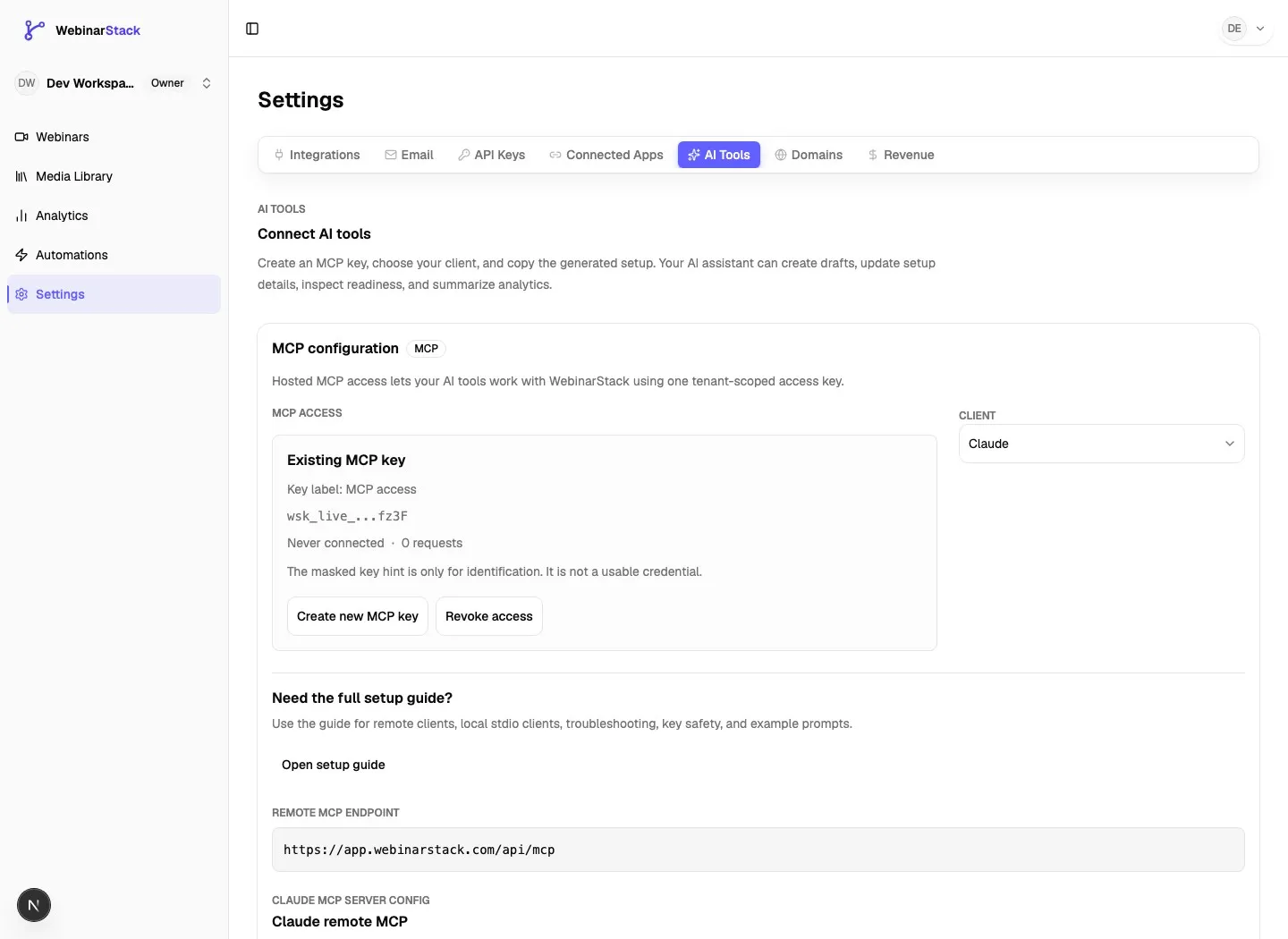
| MCP endpoint URL | Settings > AI Tools, or the Claude card in Settings > Integrations. | Copy the URL ending in /api/mcp. |
| MCP key, if using header auth | Settings > AI Tools. | The plaintext key appears once. Store it securely. |
| API key scopes, if using a custom key | Settings > API Keys. | Use the mcp surface and the minimum scopes needed. |
| Claude Code installed and signed in | Your local terminal. | Run claude --version if you need to confirm the CLI is available. |
Do not paste real API keys into prompts, issue trackers, screenshots, support tickets, or source files. Use placeholders such as WEBINARSTACK_API_KEY in examples.
Connection Option 1: Remote HTTP With OAuth
Section titled “Connection Option 1: Remote HTTP With OAuth”Use this option when you want Claude Code to complete the connector authorization flow in a browser.
- Copy the WebinarStack MCP endpoint from settings.
- In a terminal, add the server:
claude mcp add --transport http webinarstack https://YOUR-WEBINARSTACK-HOST/api/mcp- Start Claude Code in the project where you want to use it.
- Run:
/mcp- Find
webinarstack. - If Claude Code says authentication is needed, choose the authentication option.
- Complete the browser flow.
- Sign in to WebinarStack if prompted.
- Choose the WebinarStack account Claude should access.
- Review the requested permissions.
- Approve the connection.
- Return to Claude Code and confirm the server shows as connected.
This flow uses WebinarStack’s OAuth support. Claude Code discovers the authorization metadata from the MCP server, opens the browser, and stores the resulting authentication securely through its own client flow.
Use OAuth when you do not want to create or manually paste a WebinarStack API key into a Claude Code config.
Connection Option 2: Remote HTTP With An MCP Key
Section titled “Connection Option 2: Remote HTTP With An MCP Key”Use this option when you want a stable key-based configuration.
- In WebinarStack, go to Settings > AI Tools.
- Create an MCP key.
- Copy the plaintext key when it is shown.
- Store it in your shell environment or secret manager as
WEBINARSTACK_API_KEY.
After the key is created, WebinarStack shows a masked key hint, the hosted endpoint, and generated client configuration. The plaintext key is only shown in the one-time reveal dialog.
For a local shell session:
export WEBINARSTACK_API_KEY="wsk_live_REDACTED"Then add the server using JSON so the config references the environment variable instead of storing the literal key value:
claude mcp add-json webinarstack '{"type":"http","url":"https://YOUR-WEBINARSTACK-HOST/api/mcp","headers":{"Authorization":"Bearer ${WEBINARSTACK_API_KEY}"}}'Verify it:
claude mcp get webinarstackThen open Claude Code and run:
/mcpIf the environment variable is missing when Claude Code starts, the server may fail authentication. Set WEBINARSTACK_API_KEY, restart Claude Code, and check /mcp again.
Connection Option 3: Local Stdio Wrapper
Section titled “Connection Option 3: Local Stdio Wrapper”Use local stdio when you want Claude Code to launch a local process that forwards requests to the hosted WebinarStack MCP endpoint.
This is useful when:
- You already manage MCP servers as local stdio processes.
- You want one local wrapper command that can target production, staging, or local development by changing
--server-url. - You are copying the same config into clients that only support stdio MCP servers.
Create or export your MCP key first:
export WEBINARSTACK_API_KEY="wsk_live_REDACTED"Then add the stdio server:
claude mcp add --env WEBINARSTACK_API_KEY="$WEBINARSTACK_API_KEY" --transport stdio webinarstack -- npx -y @webinarstack/mcp --server-url https://YOUR-WEBINARSTACK-HOST/api/mcpEquivalent JSON shape:
{ "mcpServers": { "webinarstack": { "command": "npx", "args": ["-y", "@webinarstack/mcp", "--server-url", "https://YOUR-WEBINARSTACK-HOST/api/mcp"], "env": { "WEBINARSTACK_API_KEY": "${WEBINARSTACK_API_KEY}" } } }}The wrapper authenticates with WEBINARSTACK_API_KEY and forwards MCP traffic to the same remote endpoint used by the OAuth and remote HTTP options.
Connection Option 4: Use A Claude Web Connector In Claude Code
Section titled “Connection Option 4: Use A Claude Web Connector In Claude Code”If you added the WebinarStack connector in Claude Web and you use Claude Code with the same Claude account, Claude Code may show that claude.ai connector in /mcp.
Use this flow when your organization wants to manage the connector centrally in Claude Web:
- Add the custom connector in Claude Web.
- Authenticate it against WebinarStack.
- Open Claude Code while signed in with the same Claude account.
- Run
/mcp. - Look for the WebinarStack connector entry from claude.ai.
- Enable it for the current session if needed.
If Claude Code does not show the claude.ai connector, check how Claude Code is authenticated. Claude.ai connectors are not loaded when the session is using an ANTHROPIC_API_KEY, ANTHROPIC_AUTH_TOKEN, a custom API key helper, Bedrock, Vertex, or another provider authentication path.
Which Option Should You Choose?
Section titled “Which Option Should You Choose?”| Situation | Recommended Setup |
|---|---|
| You want the easiest Claude Code setup with browser auth | Remote HTTP with OAuth. |
| You want a scriptable setup with a key in an environment variable | Remote HTTP with MCP key. |
| Your MCP client only supports local stdio servers | Local stdio wrapper. |
| Your company manages connectors in Claude Web | Use the Claude Web connector in Claude Code. |
| You are testing against local or staging WebinarStack | Local stdio wrapper with --server-url pointing at that environment. |
| You do not want a persistent API key in any Claude Code config | OAuth. |
For most users, start with remote HTTP and OAuth. Use an MCP key when you need deterministic local configuration, service-account-like operation, or compatibility with clients that cannot complete OAuth.
Scopes And Permissions
Section titled “Scopes And Permissions”WebinarStack has two permission models that can authenticate to MCP.
| Credential Type | How It Is Created | Where To Revoke | Notes |
|---|---|---|---|
| OAuth connector grant | Claude Code or Claude Web starts the OAuth flow. | Settings > Connected Apps. | Claude stores and refreshes the token. You do not copy the token. |
| MCP API key | Settings > AI Tools or Settings > API Keys. | Settings > AI Tools or Settings > API Keys. | You copy the wsk_live_ key once and store it in your client config. |
MCP API keys created from Settings > AI Tools are MCP-purpose keys with the AI Tools surface enabled. Custom keys from Settings > API Keys can be narrowed by resource scope and surface.
Available resource scopes:
| Scope | What It Allows Through MCP |
|---|---|
webinars:read |
List webinars, read setup summaries, read product/docs resources, and use health-style context. |
webinars:write |
Create drafts and update webinar-level setup such as core details, branding, video provider, schedule, registration-page basics, replay defaults, and offer/replay basics. |
sessions:read |
Read upcoming sessions and schedule-related setup details. |
sessions:write |
Use supported session write operations exposed through the API surface. |
registrations:read |
Read registration-related setup and analytics inputs. |
registrations:write |
Create test registrations or other registration writes exposed to MCP. |
automations:read |
List, inspect, and compare automation rules. |
automations:write |
Update or delete automation rules and use workflow tools that configure automation sequences. |
interactions:read |
List, inspect, and compare polls and CTA offers. |
interactions:write |
Create, update, or delete polls and CTA offers. |
Grant only what the client needs. A read-only analytics assistant does not need write scopes. A launch assistant that creates drafts and setup changes needs broader access.
MCP Tools By Category
Section titled “MCP Tools By Category”Claude Code will show tool names in an MCP-specific format, but the WebinarStack server registers these product-level capabilities.
| Category | Examples | Typical Prompt |
|---|---|---|
| Health and tenant context | webinarstack.health |
“Confirm you can reach WebinarStack and tell me which account this connection is scoped to.” |
| Webinar reads | webinarstack.webinars.list, webinarstack.webinars.summary |
“List my webinars and summarize the setup status for the one named Spring Launch.” |
| Webinar setup writes | create_draft, update_core_details, update_branding_settings, update_video_provider, update_schedule, update_registration_page_basics, update_offer_replay_basics |
“Create a draft webinar from this launch brief, but do not publish anything.” |
| Readiness and schedule | setup_status, upcoming_sessions, create_test_registration |
“Audit this webinar and create one test registration after you identify the right session.” |
| Analytics | analytics_summary |
“Explain registrations, attendance, engagement, offer clicks, replay behavior, and biggest opportunities.” |
| Workflow composites | setup_end_to_end, clone_with_new_schedule, add_replay_with_new_offer, configure_automation_sequence, register_test_attendees |
“Clone this webinar for next month and keep the same setup, then show me what changed.” |
| Automations | automations_list, automations_get, automations_find_matching, automations_update, automations_delete |
“Find duplicate reminder automations before changing anything.” |
| Interactions | interactions_list, interactions_get, interactions_find_matching, interactions_create, interactions_update, interactions_delete |
“Add a poll at the two-minute mark, but first check whether an overlapping poll already exists.” |
Delete tools exist for automation rules and interactions. Treat them as high-risk. Prefer disabling an automation rule when you only want to stop it temporarily.
MCP Resources And Prompts
Section titled “MCP Resources And Prompts”The server also exposes resources and prompt templates that help Claude Code work safely.
| Resource Or Prompt | What It Is Used For |
|---|---|
webinarstack://tenant/current/info |
Authenticated account and capability metadata. |
webinarstack://docs/product |
Product guidance for safe MCP-assisted webinar setup. |
webinarstack://docs/automation-email-authoring |
Email personalization token and Tiptap body guidance for automation emails. |
webinarstack://docs/interaction-authoring |
Poll and CTA offer authoring guidance. |
webinarstack://openapi/v1 |
OpenAPI metadata for the public REST API. |
webinarstack://tools/catalog |
The current MCP tool catalog. |
webinarstack://webinars/{webinarId}/summary |
Concise setup and status context for one webinar. |
webinarstack_setup_checklist |
Baseline launch-readiness checklist prompt. |
webinarstack_create_webinar |
Prompt template for creating a draft from a launch brief. |
webinarstack_audit_setup |
Prompt template for setup readiness review. |
webinarstack_improve_conversion |
Prompt template for conversion improvement ideas. |
webinarstack_explain_analytics |
Prompt template for aggregate analytics explanation. |
When in doubt, ask Claude Code to read before writing. A good MCP workflow starts by listing or summarizing the webinar, then making narrow changes.
Example Prompts
Section titled “Example Prompts”Confirm The Connection
Section titled “Confirm The Connection”Use the WebinarStack MCP server to confirm the connection is working.
Return:- The account context if available- The number of WebinarStack tools you can see- Whether you can list webinars
Do not change anything.Audit A Webinar Before Launch
Section titled “Audit A Webinar Before Launch”Use WebinarStack MCP to audit the webinar named "[webinar name]".
Check:- Core details- Schedule- Video provider- Registration page basics- Offer and replay setup- Test registration status- Upcoming sessions
Return a prioritized launch checklist. Do not publish or delete anything.Create A Draft From A Launch Brief
Section titled “Create A Draft From A Launch Brief”Create a WebinarStack draft from this launch brief:
Product:Audience:Offer:Target launch date:Presenter:Main outcome:
Use WebinarStack MCP tools to create the draft and propose registration-page copy. Stop before publishing. Show me every field you changed.Improve Analytics
Section titled “Improve Analytics”Use WebinarStack MCP to explain analytics for "[webinar name or ID]".
Summarize:- Registrations- Attendance- Engagement- Offer performance- Replay behavior- Biggest drop-off point- Three recommended changes
Use aggregate analytics only. Do not request raw attendee event dumps.Safely Update Automations
Section titled “Safely Update Automations”I want to add a reminder automation for "[webinar name or ID]".
Before creating or changing anything:1. List existing automations.2. Find matching reminder rules.3. Tell me whether this would duplicate an existing rule.
Only make changes after I confirm.Verify The Setup
Section titled “Verify The Setup”Use these checks after adding the server.
claude mcp listExpected result:
webinarstackappears in the list.- The server is connected, cached, or needs authentication.
- It does not show a failed connection or malformed config warning.
Then:
claude mcp get webinarstackExpected result:
- The URL points to the endpoint from WebinarStack settings.
- The type is
httpfor remote HTTP or a stdio command for the local wrapper. - Any header or env references are present without accidental extra spaces.
Inside Claude Code:
/mcpExpected result:
- WebinarStack appears.
- Authentication is complete, or Claude Code gives you a browser-auth option.
- Tool count appears after connection.
Finally, ask a read-only test:
Use WebinarStack MCP to list my webinars. Do not change anything.Troubleshooting
Section titled “Troubleshooting”401 Unauthorized Or 403 Forbidden
Section titled “401 Unauthorized Or 403 Forbidden”Check:
- The server URL ends in
/api/mcp. - The MCP key starts with
wsk_live_if you are using API-key auth. - The header is exactly
Authorization: Bearer <key>. - The key was copied without whitespace, quotes, or a masked
...abcddisplay value. - The key has the AI Tools /
mcpsurface. - The OAuth grant or API key has not been revoked.
- The key belongs to the same WebinarStack account you are trying to use.
The Server Needs Authentication
Section titled “The Server Needs Authentication”Run /mcp inside Claude Code and complete the browser flow. If the browser redirect fails after signing in, Claude Code may ask you to paste the callback URL from the browser address bar back into the terminal.
The Server Was Added But Tools Do Not Appear
Section titled “The Server Was Added But Tools Do Not Appear”Check:
claude mcp listfor connection status.claude mcp get webinarstackfor the exact config./mcpfor pending authentication or approval.- Whether you accidentally added the same endpoint twice. A local Claude Code server can take precedence over a claude.ai connector pointing at the same URL.
WEBINARSTACK_API_KEY Is Not Set
Section titled “WEBINARSTACK_API_KEY Is Not Set”Set the variable in the shell that starts Claude Code:
export WEBINARSTACK_API_KEY="wsk_live_REDACTED"claudeIf you launch Claude Code from an editor, make sure the editor process also has that environment variable.
The Local Wrapper Fails To Start
Section titled “The Local Wrapper Fails To Start”Check:
- Node.js and npm are installed.
npx -y @webinarstack/mcp --server-url https://YOUR-WEBINARSTACK-HOST/api/mcpcan run.- The
--server-urlvalue ends in/api/mcp. - The key is present in the stdio server’s
envobject.
A Key Was Lost Or Exposed
Section titled “A Key Was Lost Or Exposed”Create a replacement key, update Claude Code, verify the replacement works, then revoke the old key from WebinarStack.
Do not leave a lost key active. If the key was pasted into an AI prompt, screenshot, ticket, public repository, or build log, treat it as compromised.
A Claude Web Connector Is Not Showing In Claude Code
Section titled “A Claude Web Connector Is Not Showing In Claude Code”Check:
- Claude Code is signed in with your Claude account, not only an API key.
- The connector was added and authenticated in Claude Web.
- The connector is enabled for the current conversation or project where Claude Code can load it.
- No local MCP server with the same endpoint is taking precedence.
Operational Best Practices
Section titled “Operational Best Practices”- Use OAuth for personal Claude Code usage when possible.
- Use an MCP key for service-like local configurations or clients that cannot complete OAuth.
- Keep
WEBINARSTACK_API_KEYout of source control. - Prefer one key per user, machine, or service.
- Use read-only prompts before write prompts.
- Ask Claude Code to show planned changes before applying them.
- Avoid allowing broad write tools in unattended runs.
- Review API Keys activity for MCP tool calls when using key-based auth.
- Review Connected Apps for OAuth connector grants.
- Revoke unused or unclear grants.
Related Guides
Section titled “Related Guides”Official Claude references: